




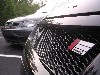

I couldnt get the hue and saturation to work. I just selected the area and went to image-->adjustments-->gradient map then changed it to the white and black gradient. It keeps all the highlights and shadows (harder to see on black) that were there with the green, but transfers them to a newer color.Originally Posted by Nittanys1

Glad I could help with your decision Brett, it should look great when its done


 Reply With Quote